Lead Generation – Capture and Manage AI Chat Agent Leads
Learn how Kipps.AI’s intelligent Lead Generation system transforms AI Chat Agent conversations into qualified business leads. This guide covers everything from configuring lead forms and managing submissions to analyzing performance metrics—empowering you to automate customer acquisition and boost conversions across platforms.
Overview
The AI Chat Agent Lead Generation system in Kipps.AI is an intelligent customer acquisition tool that captures prospect information during conversations. It automatically presents customizable lead forms inside the chat interface, converting website visitors into qualified leads through contextual form placement and automated processing.
Lead Generation Configuration
Settings Interface
Business owners can configure the lead system through an intuitive settings panel offering:
- Master Toggle Control: Enable or disable lead collection globally
- Custom Form Title: Set a personalized form heading, e.g., "Let us know how to contact you"
- Field Selection Options: Toggle collection of name, email, and phone individually
- Real-time Preview: Instantly see how the form appears inside the chat interface
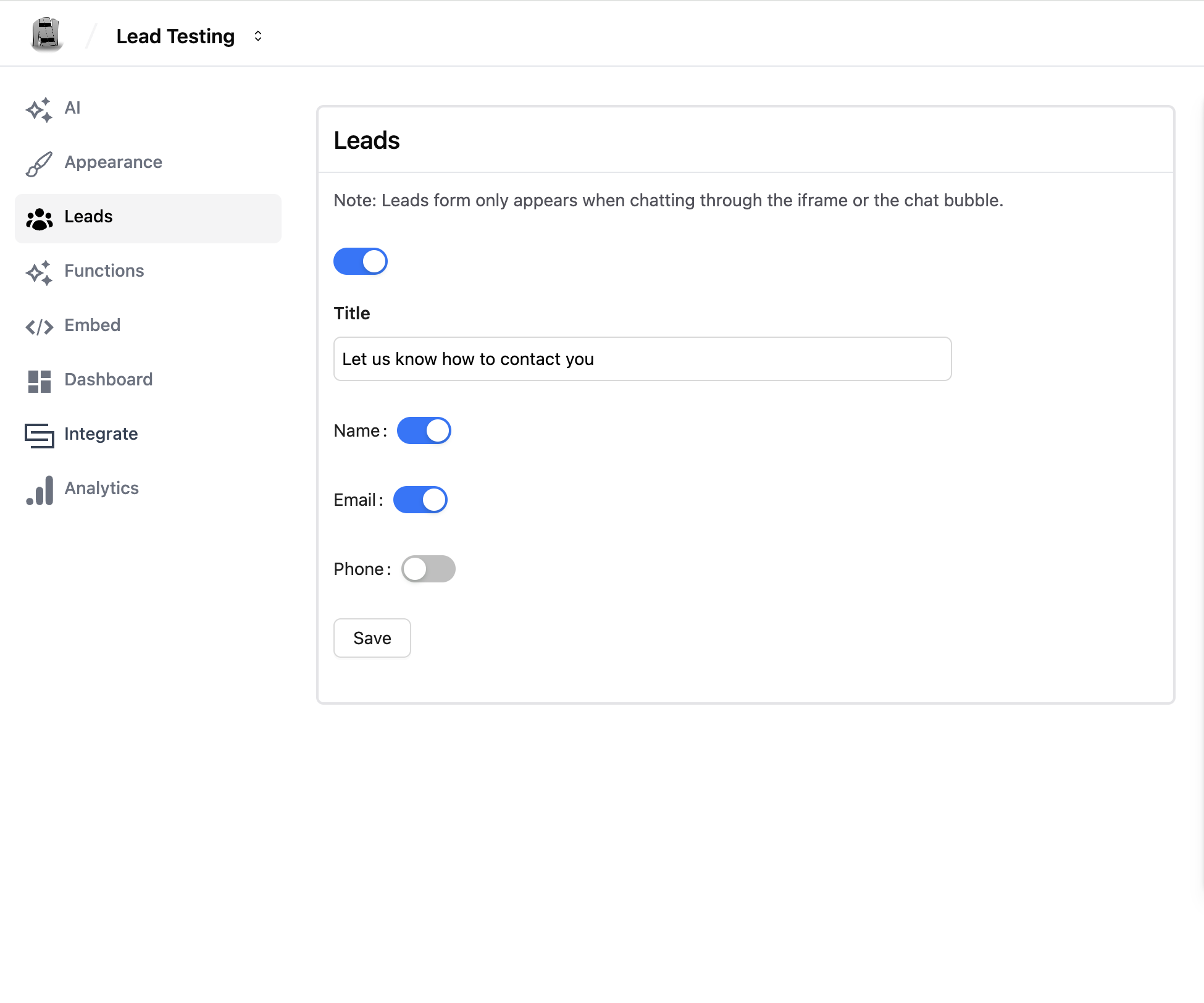
Field Configuration Options
Supported lead fields include:
- Name Field: For personalized follow-up
- Email Field: For marketing or support communication
- Phone Field: For qualification or direct contact
Each field can be enabled or disabled independently based on your business objectives.
Send Frequency
By default, the lead form appears after the very first message and continues to appear after every subsequent message until it is filled out. You can now control this timing with two settings under Send Frequency:
- Show form after this many messages: The number of messages (one user message plus the AI Chat Agent's reply counts as one) before the lead form first appears. Leave this at
1to keep the default behavior. - Repeat after every N messages until filled: Once the form has appeared, it will only reappear every N messages instead of after every single message, until the user submits it. Leave this at
1to keep the default behavior.
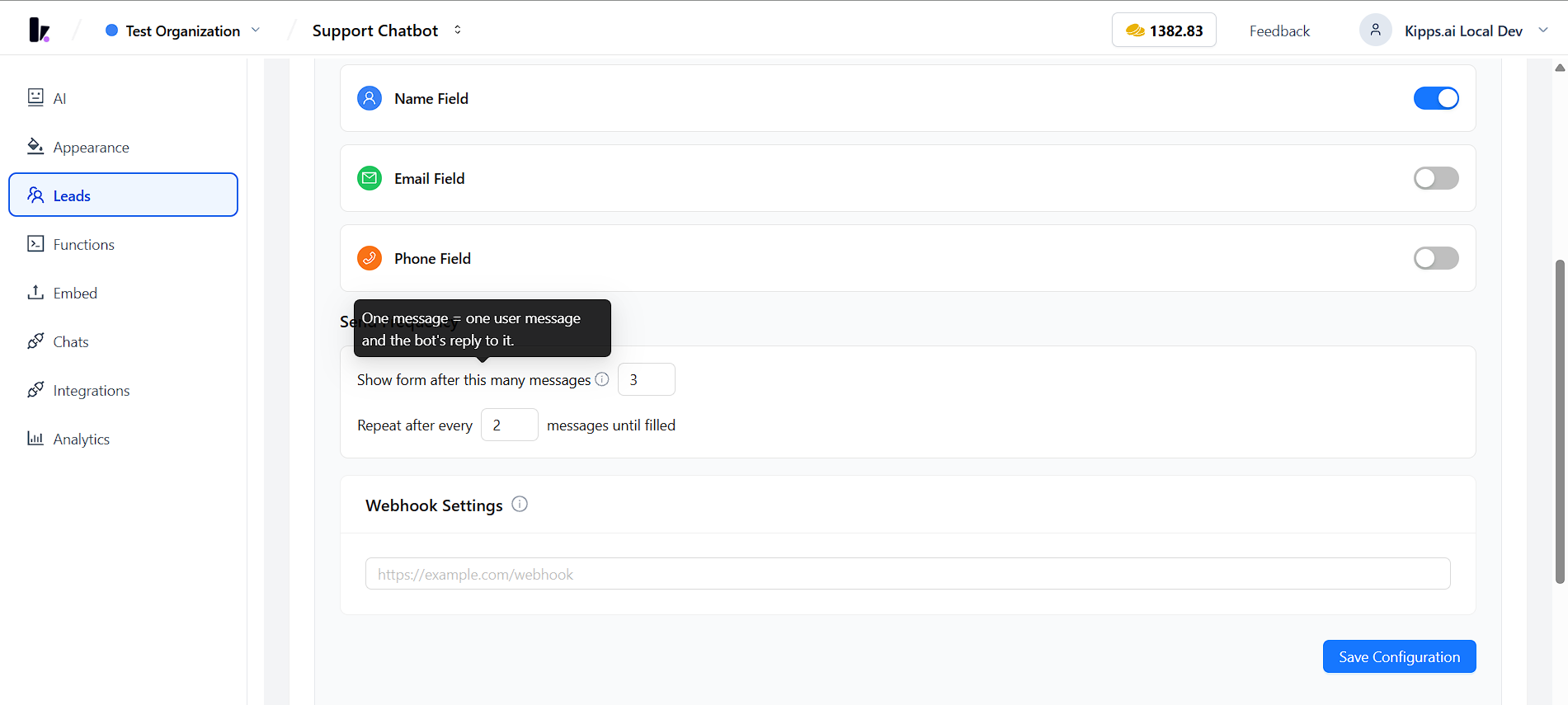
This lets you space out the form so it feels less repetitive during longer conversations, while still ensuring it keeps coming back until a lead is captured.
Lead Form User Experience
Form Appearance in Chat
The form is naturally embedded in the conversation:
- Contextual Timing: Appears when the user is most engaged
- Visual Integration: Matches AI Chat Agent themes and brand appearance
- Responsive Design: Mobile-optimized with adaptive layout
- User-Friendly: Minimal UI, clear labeling, intuitive interaction
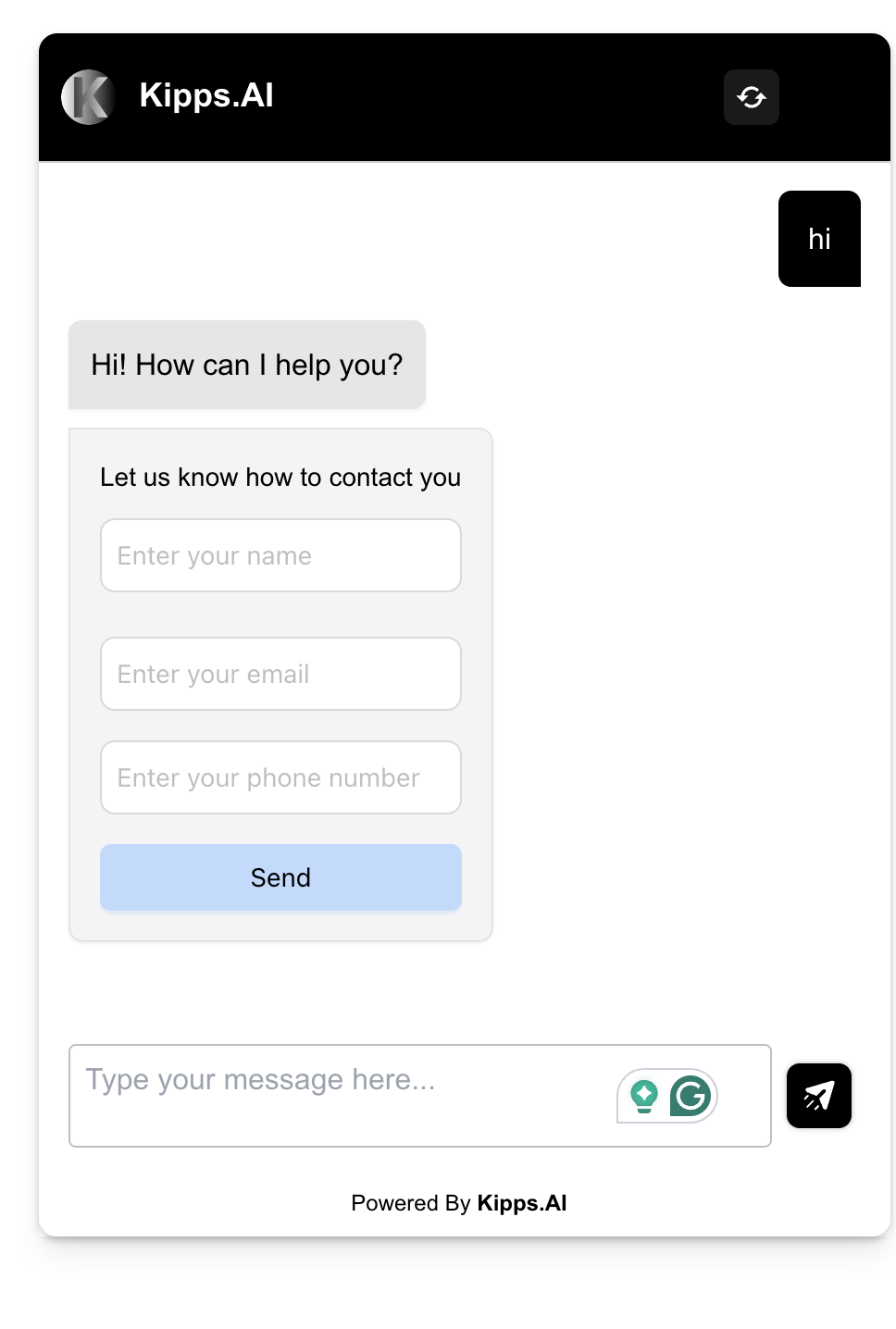
Form Submission Process
- Real-time Validation: Inline feedback and error prompts
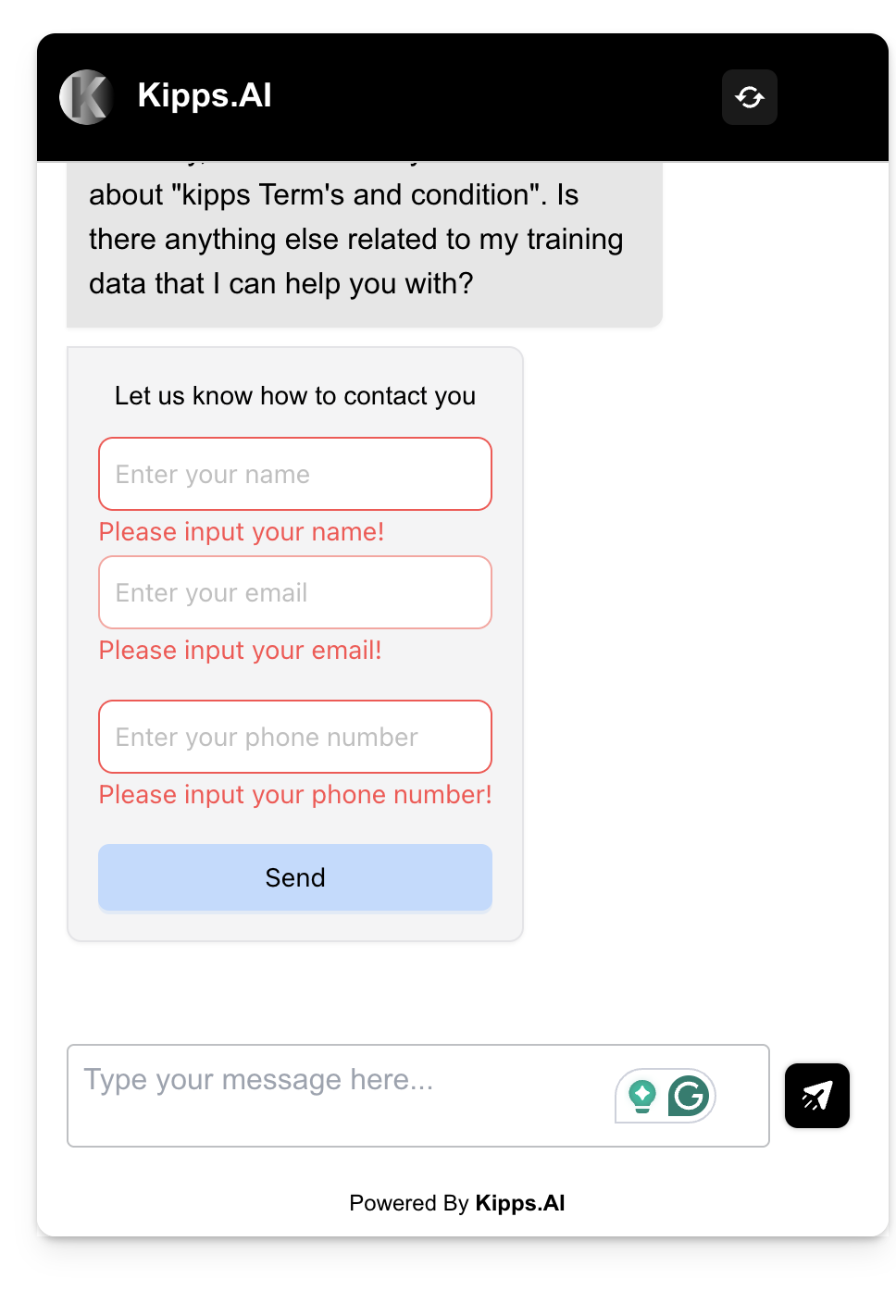
- Loading Indicators: Status feedback during submission
- Success Message: Confirmation displayed after form completion
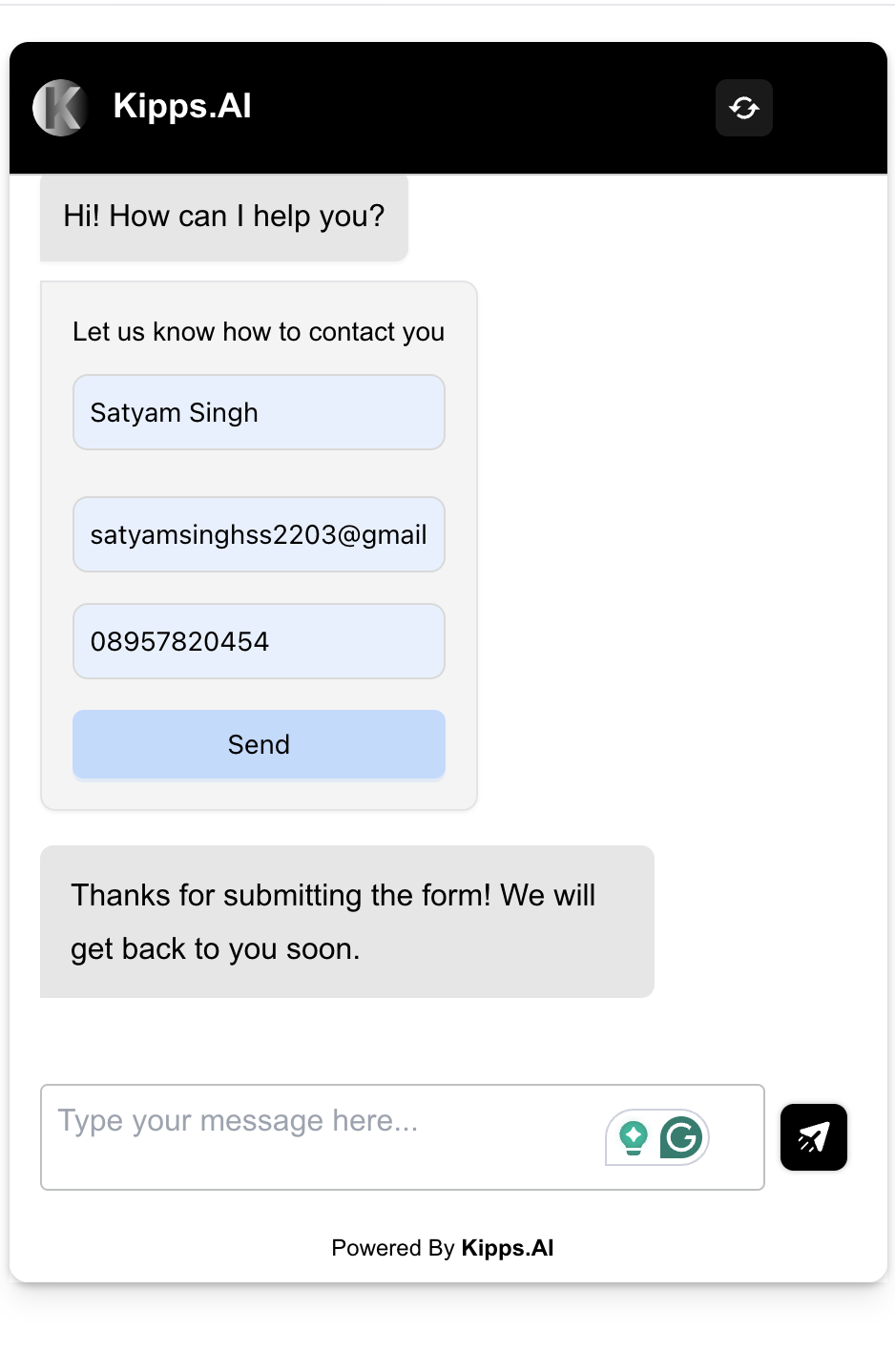
- Conversation Resumption: Seamless return to conversation flow
Lead Management Dashboard
Lead Overview Interface
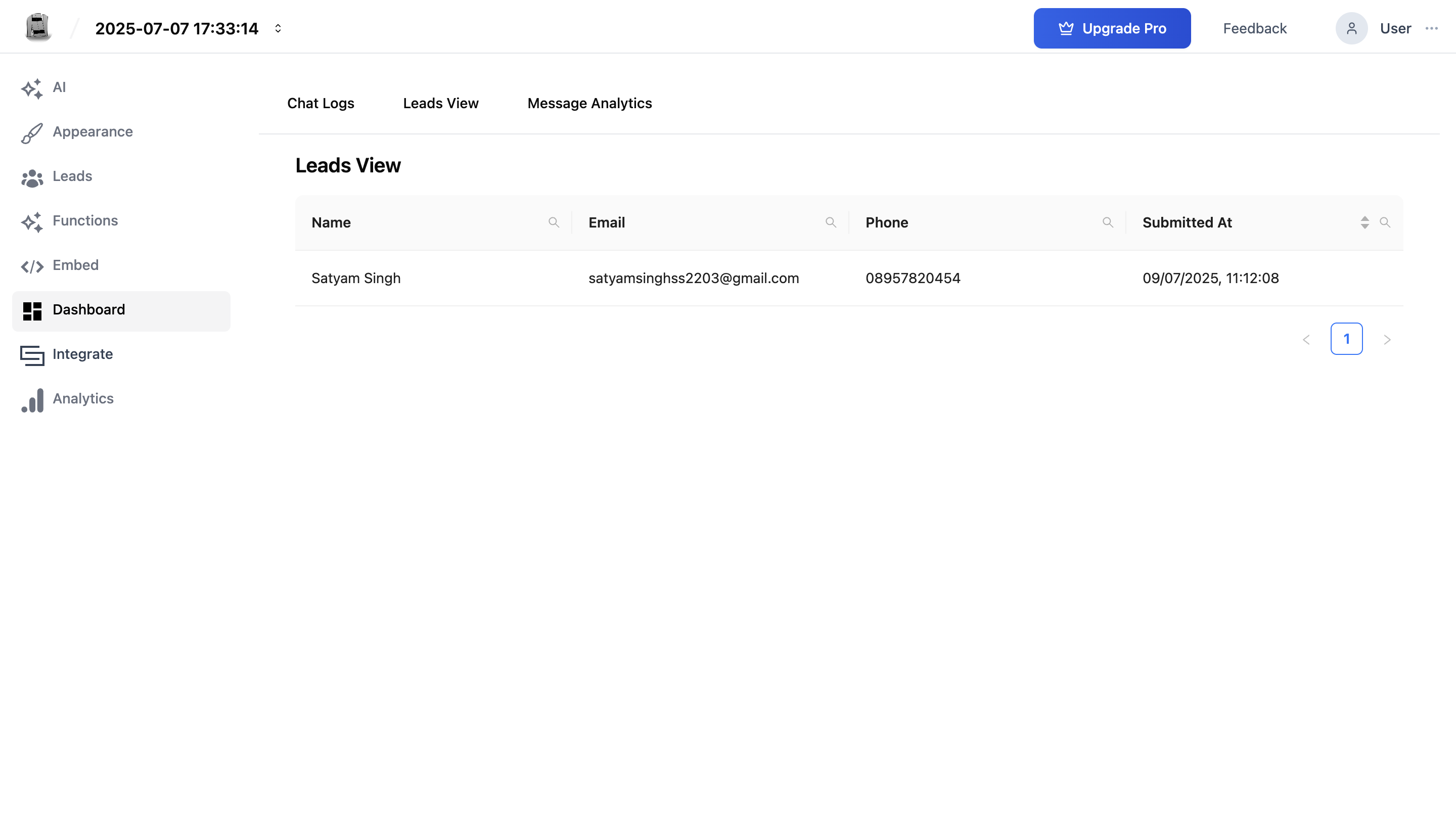
A central dashboard enables efficient lead tracking:
- Lead Listing: Filterable and searchable table of leads
- Contact Details: Name, email, and phone view
- Submission Timestamps: Date and time of form submission
- Conversation Context: Link to the full conversation where the lead was captured
Lead Details View
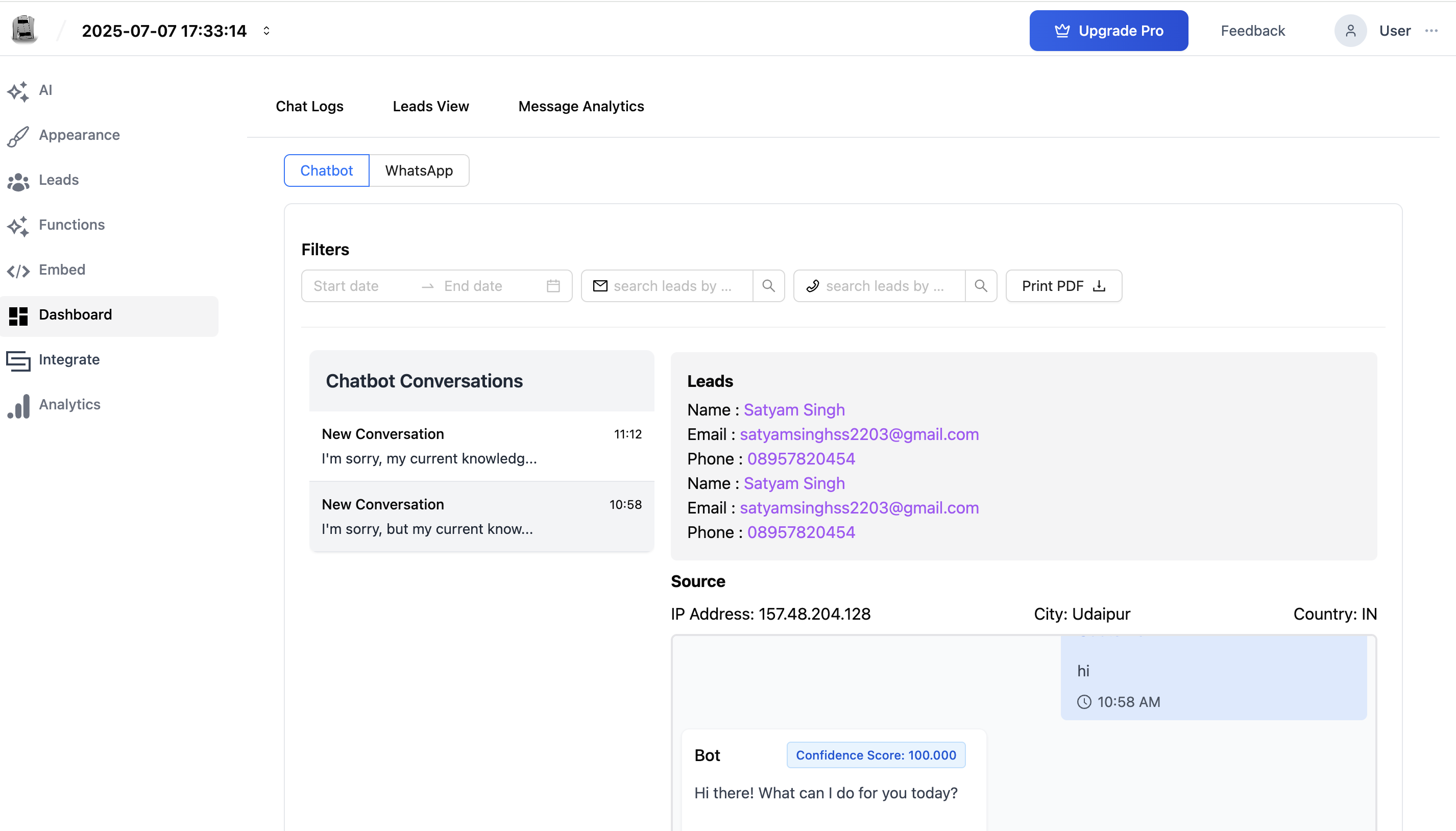
Each lead record includes:
- Contact info (name, email, phone) with click-to-contact links
- Submission timestamp
- Original chat transcripts
- Leads and chat transcripts can be exported as PDF using the “Print PDF” button
Lead Analytics and Insights
The built-in analytics dashboard helps track performance:
- Marketing Channel Attribution: Pinpoint the highest-performing traffic sources to analyze and optimize marketing campaign ROI.
- Lead Conversion Rate: Measure the core success metric by tracking the percentage of chat interactions that successfully convert into qualified leads.
- Lead Qualification Metrics: Assess the quality and viability of leads using key indicators derived from user intent analysis and engagement duration.
- Performance Trend Analysis: Monitor lead generation performance across daily and weekly intervals to identify behavioral patterns and strategic growth opportunities.
Conversation Integration
Captured lead data is deeply linked with conversations:
- Chat Logs: Lead data shown alongside conversation records
- Follow-up Opportunities: Identify prospects needing nurturing
- Lead Journey Tracking: Track the funnel from chat start to conversion
Technical Implementation Benefits
Intelligent Lead Capture
- Engagement Assessment: Trigger forms only for interested users
- Contextual Insertion: No disruption to conversation
- Conditional Visibility: Display form only when enabled
- Optimized Timing: Insert form during high-conversion moments
Data Management Excellence
- Secure Storage: Encrypted with access controls
- Linked Records: Each lead is mapped to its chat session
- Duplicate Handling: Prevent repeated entries
- Server Validation: Backend checks for data quality
Multi-Platform Compatibility
Lead capture works across all channels:
- Website Embeds: Full lead collection in iframes
- Mobile Optimization: Smooth UX on all screen sizes
- Cross-browser Support: Chrome, Firefox, Safari, and more
- API Integration: Expose lead data to CRMs or internal tools
Business Value Proposition
1. Accelerate Customer Acquisition
- Capture High-Intent Leads: Engage visitors at the peak of their interest with contextual conversations, instantly converting anonymous traffic into qualified prospects for your sales team.
- Maximize Conversion Rates: Replace static forms with frictionless, AI chat flows that make lead submission effortless, significantly boosting your lead capture performance.
- Automate Lead Qualification: Instantly filter and qualify prospects through intelligent conversation, ensuring your sales team only spends time on high-quality, sales-ready leads.
2. Drive Operational Efficiency
- Empower Your Sales Team: Deliver new leads and their conversation history directly into your workflow with real-time alerts, enabling immediate and informed follow-up when it matters most.
- Automate Your Workflow: Natively sync every lead with your CRM (e.g., HubSpot, Zoho, etc), eliminating manual data entry and freeing your team to focus on selling.
- Operate 24/7: Automatically capture and qualify leads around the clock, ensuring you never miss an opportunity, regardless of business hours or staff availability.
3. Unlock Strategic Insights
- Optimize Your Conversion Funnel: Analyze user behavior and conversation data to understand what truly drives engagement, allowing you to continuously refine messaging and improve performance.
- Identify High-Value Channels: Pinpoint which marketing sources deliver the most valuable leads, enabling you to make data-driven decisions and maximize your return on ad spend (ROAS).
- Gain Full Funnel Visibility: Track every touchpoint in the buyer's journey—from initial click to qualified lead—to identify and eliminate bottlenecks for sustainable growth.
Operational Efficiency
- Instant Lead Access: Real-time lead availability to sales teams
- CRM-Ready: Syncs with systems like Zoho or HubSpot
- Real-time Notifications: Alert teams as soon as leads come in
- Zero Manual Input: Fully automated data capture and storage
Strategic Insights
- Behavior Tracking: Analyze what prompts users to submit
- Conversion Optimization: Improve placement and messaging
- Source Analysis: Determine your best-performing channels
- Lead Funnel Visibility: Monitor and improve touchpoints
Configuration Steps
- Go to your AI Chat Agent workspace > Leads tab
- Enable Lead Collection via the toggle switch
- Set a Form Title (optional)
- Toggle ON/OFF the desired fields – Name, Email, Phone
- (Optional) Under Send Frequency, set when the form should first appear and how often it should repeat
- Use the Live Preview on the right to check form appearance
- Click Save
You’re now ready to start capturing leads from live users in real-time.
The Kipps.AI Lead Generation system transforms casual chat interactions into valuable, qualified business opportunities—optimizing conversion without compromising on user experience.
Troubleshooting
The lead form is enabled but it never appears during conversations. Check the Show form after this many messages setting under Send Frequency — if it's set higher than the number of messages exchanged so far, the form won't have appeared yet. If the form is still not appearing after extended conversations, confirm the Lead Collection toggle is enabled and saved, and that at least one field (Name, Email, or Phone) is toggled on.
Leads are being submitted but not appearing in the Lead Management Dashboard. The dashboard updates in near real time. If leads are missing, try refreshing the page. Filter the dashboard to confirm no date range or search filter is hiding recent submissions. If leads are still absent, verify the agent where leads were submitted matches the agent dashboard you are viewing.
Users are submitting the form but their details are incorrect (e.g., fake emails). The system includes real-time validation for format (valid email format, numeric phone) but cannot verify that the data is accurate. For higher-quality leads, configure the agent instructions to ask qualifying questions before the lead form appears — this context selects for more engaged and genuine prospects.
The PDF export includes old leads I did not want in the export. PDF exports are filter-aware. Apply the desired date range, email, or other filters in the Lead Management Dashboard before exporting. Only the currently visible leads are included in the export.
Frequently Asked Questions
When exactly does the lead form appear in the conversation?
The lead form appears based on the Send Frequency settings you configure — how many messages must pass before it first shows, and how often it repeats afterward until submitted. By default both are set to 1, so the form appears after the first message and after every message thereafter. Increasing these values spaces the form out for a less repetitive experience.
Can I make the lead form required before the conversation continues? Currently the lead form is optional for users — they can dismiss it and continue chatting. For use cases requiring mandatory lead capture, configure the agent's instructions to ask for the user's name and contact details conversationally as part of the dialogue flow.
Are leads captured across all channels (web, WhatsApp, mobile)? Lead capture via the built-in lead form works on web embed channels. For WhatsApp interactions, leads are captured through the conversation itself and appear in the dashboard when users share their contact details. Check the Channel Tabs in the Dashboard to view leads from each channel.
Can I connect captured leads directly to my CRM? Yes. Kipps.AI integrates with CRMs such as Zoho. Configure the integration in the Integrations section to automatically sync captured lead data into your CRM in real time, eliminating manual data entry.
Is there a limit to how many leads the system can store? Lead storage depends on your Kipps.AI subscription plan. Export lead data periodically as PDF or through CRM integration to maintain records beyond the platform's storage window for your plan.
Related Articles