AI Chat Agent Analytics – Measuring Success and Gaining Insights
The Analytics Dashboard helps you monitor AI Chat Agent performance, track user activity, assess conversation quality, and identify areas to optimize engagement and conversions.
Filter and Explore Your Data
At the top of the dashboard, you’ll find date filters that let you view your AI Chat Agent’s performance over different time periods—such as the last 7 days, last 30 days, or a custom date range. When you change the filter, all the metrics update automatically to show data for the selected period.
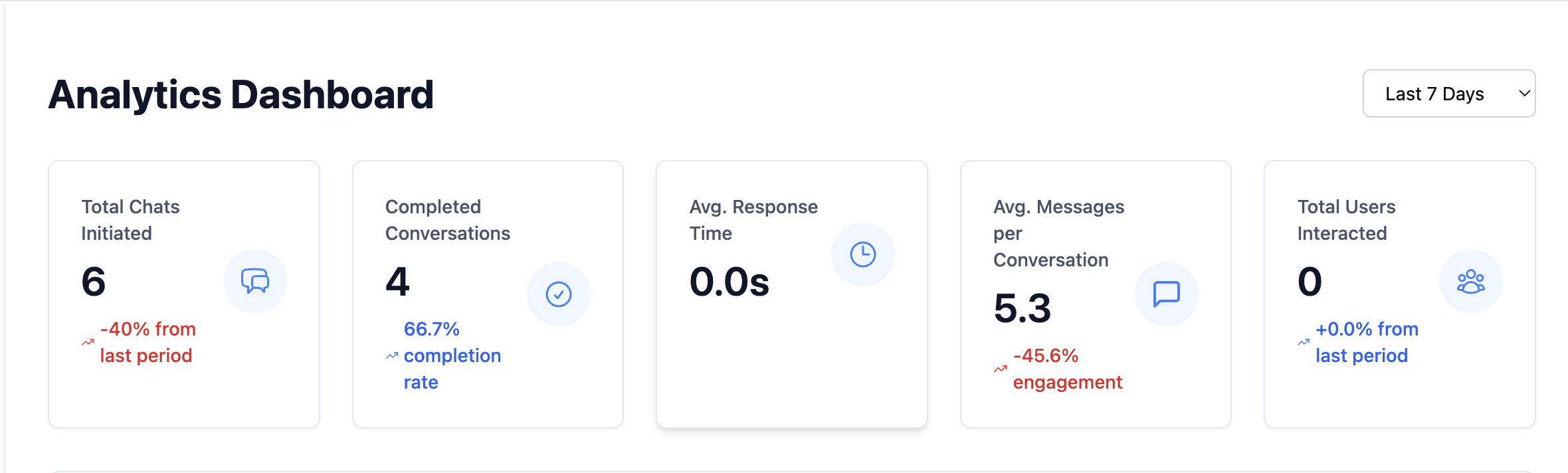
Performance Overview
This section gives you a quick summary of your AI Chat Agent’s key performance indicators. It helps you get a sense of whether your bot is on track and improving.
-
Total Chats Initiated: The total number of new conversations started by users during the selected time frame. The percentage trend shows whether conversations are increasing or decreasing compared to the previous period.
-
Completed Conversations: These are conversations that include meaningful engagement—defined here as at least two replies from the user and two from the AI Chat Agent. This shows how many conversations went beyond a simple hello and turned into valuable interactions.
-
Average Response Time: The average time it takes for your AI Chat Agent to reply after a user sends a message. Faster response times create smoother, more natural conversations.
-
Total Users: The number of unique people who chatted with your bot during the selected timeframe. This includes users across all platforms where your AI Chat Agent is active, such as your website or WhatsApp.
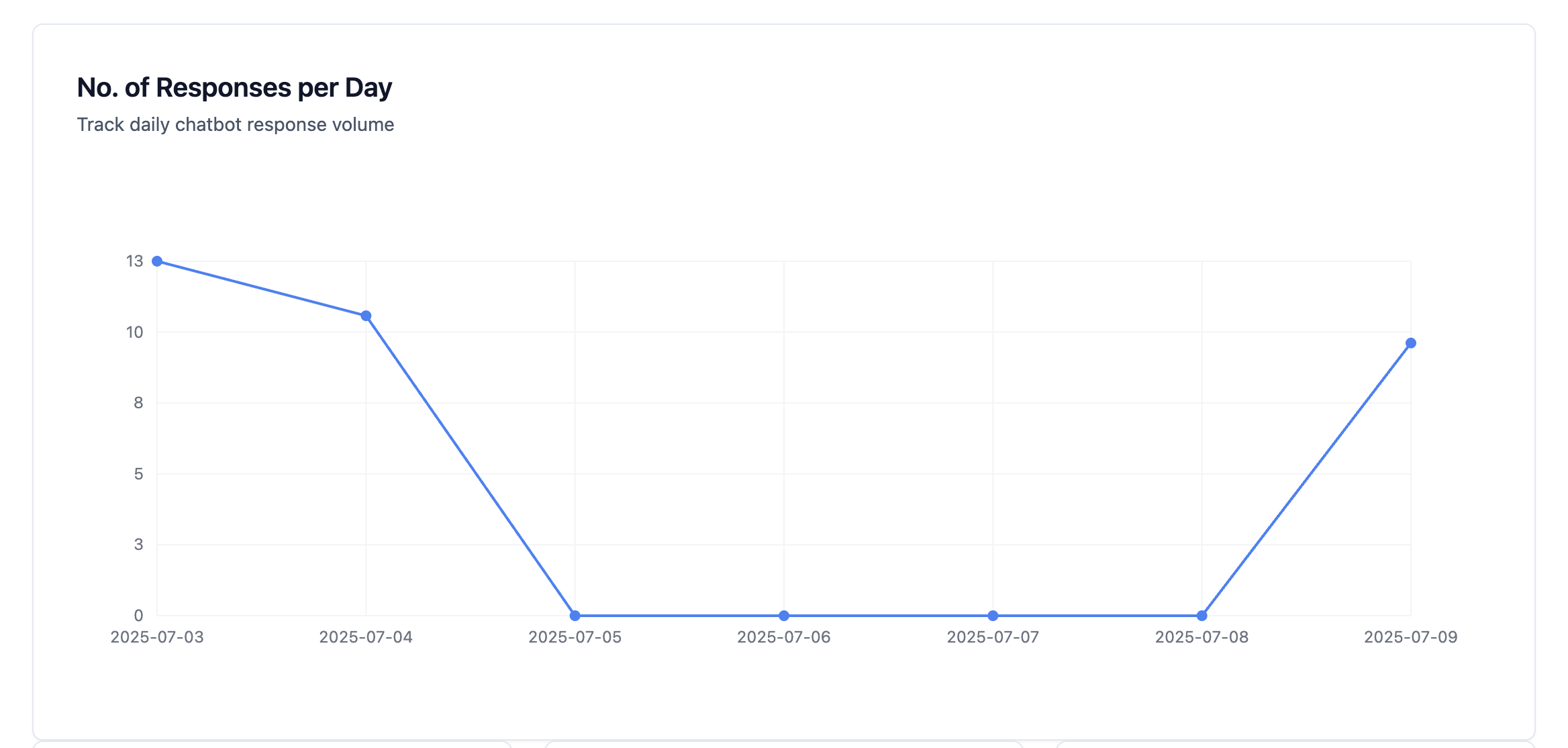
User Behavior and Engagement Patterns
This section helps you understand your audience better—who they are and how they’re interacting with the AI Chat Agent.
-
User Retention (New vs. Returning): A visual breakdown of how many users are new versus those who came back for another conversation. Returning users are a good sign that your AI Chat Agent is helpful and worth revisiting.
-
Understanding User Messages (Intent Recognition vs. Fallback):
- Intent Recognition: Shows how many user messages your AI Chat Agent correctly understood.
- Fallback Rate: Indicates how many times the bot couldn’t understand the user and gave a default response (like "I didn’t get that"). A high fallback rate means you may need to add more examples, improve the bot's wording, or expand its capabilities.
Measuring Conversions
This section tracks how well your AI Chat Agent turns conversations into business outcomes—like capturing leads.
-
Total Leads Generated: The number of people who submitted their contact details through the AI Chat Agent.
-
Conversion Rate: This is the percentage of total conversations that turned into leads. A higher rate means your AI Chat Agent is effectively achieving its goal.
-
Conversion by AI Chat Agent: If you’re running multiple bots, this section shows how each one is performing individually. You can see which ones are driving more results and which may need improvement.
-
Conversion by Source: This shows whether more conversions are coming from your website or WhatsApp, helping you decide where to focus your efforts.
Cost & ROI Analysis (Coming Soon)
This upcoming section will help you measure how much it costs to run your AI Chat Agent and what kind of return you’re getting. It will show how much you're spending on things like AI responses and voice processing. This way, you can compare those costs to the value (like leads generated) and understand how cost-effective your AI Chat Agent really is.
With the Analytics Dashboard, you can make informed decisions to continually improve your AI Chat Agent, maximize engagement, and drive more value for your business.
Best Practices for Chat Agent Analytics
- Set a weekly review habit: Check Total Chats Initiated and Conversion Rate at the same time each week to spot trends before they become problems.
- Prioritize Fallback Rate reduction: A fallback rate above 15% is a strong signal that your agent's knowledge base or conversation flows need updating. Identify the most common unrecognized queries and add them.
- Compare New vs. Returning Users: A growing returning-user segment indicates your agent is genuinely helpful—users come back because they got value the first time.
- Use Conversion by Source: If your agent is embedded on both your website and WhatsApp, this metric tells you which channel is delivering more business value, helping you prioritize where to improve.
Troubleshooting
Total Chats Initiated seems lower than expected. Verify the date filter is set to the correct range. Also check that your embed code is active on all relevant pages—if a deployment was removed or broken, that channel won't be tracked.
Conversion Rate is 0% despite receiving many chats. Conversions require the user to complete a lead form or a configured conversion event. If no form is configured in your agent's Lead settings, no conversions will be counted regardless of conversation volume.
The Fallback Rate looks correct but users are still complaining about bad answers. A low fallback rate means the agent is recognizing intents—but it may be providing answers from outdated or incorrect knowledge base content. Review and retrain your knowledge base.
Analytics data does not match what I see in my CRM. The analytics dashboard tracks conversations within Kipps.AI. Your CRM may count leads at the point of sync, which can differ by a few minutes or if the sync webhook has a delay.
Frequently Asked Questions
What qualifies as a "Completed Conversation"? A completed conversation is defined as one where the user sent at least two messages and the agent replied at least two times. This threshold filters out very brief or accidental interactions.
Are conversations from my test sessions included in the analytics? If you test the agent using the same embed or channel that production users use, those sessions will be counted. Use the admin preview mode to avoid polluting your data.
Can I see which specific questions users asked? Not directly in the analytics dashboard. For individual conversation details, use the conversation history or transcript view in the agent's chat log section.
How often does the data refresh? Metrics typically refresh within a few minutes of a conversation ending. The dashboard does not stream in real time but updates frequently throughout the day.
What happens to analytics data if I delete an agent? Deleting an agent also removes its associated analytics data. Export any reports you need before deleting an agent permanently.
Related Articles