Provider API Key - Vector Databases
Learn how to integrate your own vector database providers like Pinecone or Weaviate with Kipps.AI for secure and high-speed semantic search.
Overview
The Vector Database is the long-term memory of your AI agents. It stores your Knowledge Base content as embeddings—numerical representations that enable fast and accurate semantic search. This helps your AI Chat Agent or voicebot instantly retrieve relevant information during user interactions.
Using your own vector database provider, such as Pinecone or Weaviate, gives you full control over storage, cost, performance, and compliance.
How to Add a Vector Database API Key
You can configure Vector DB keys directly from your Kipps.AI dashboard.
Step 1: Navigate to Provider API Keys
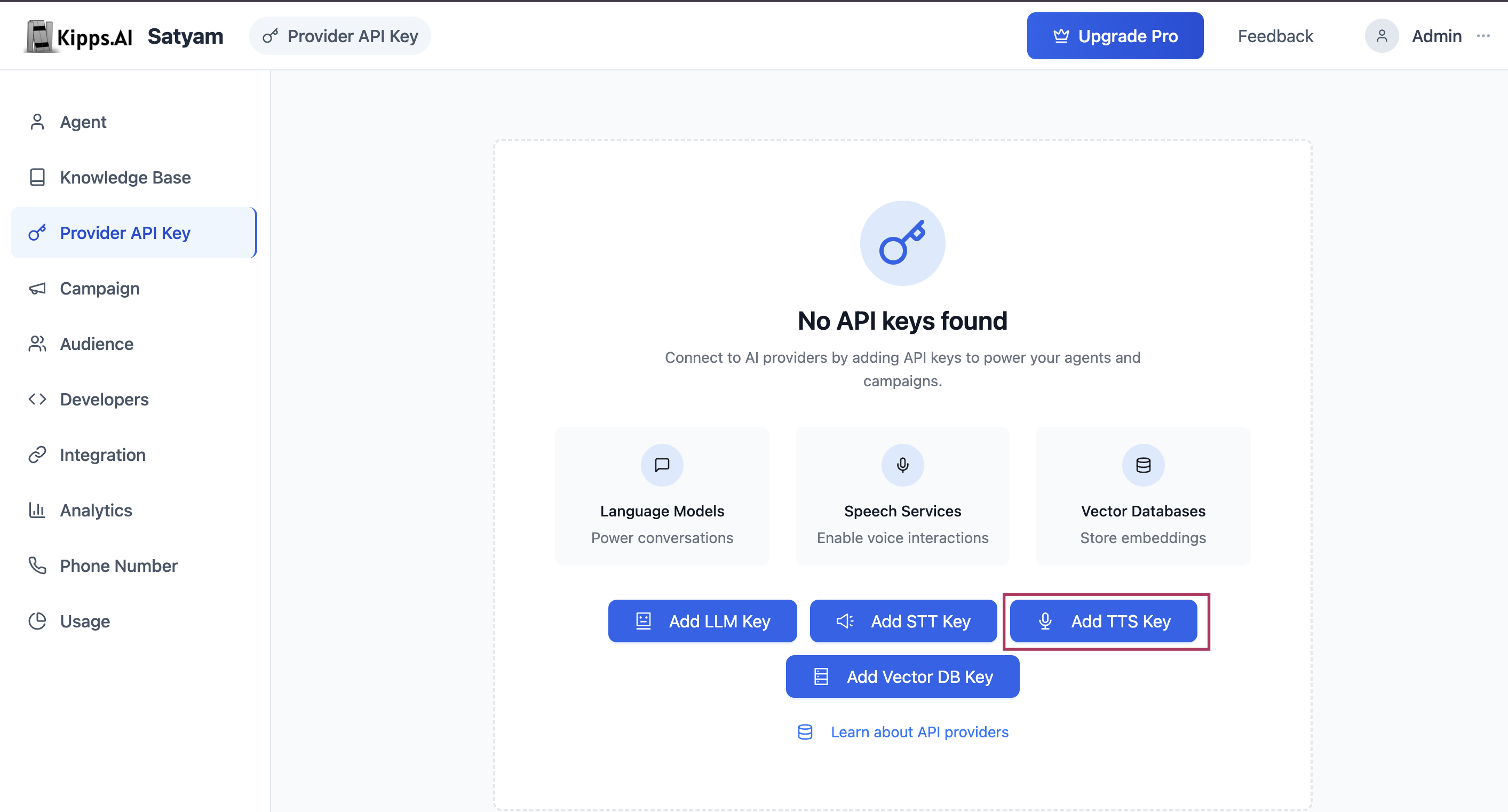
From the main dashboard, go to ** Provider API Keys**
Step 2: Add Vector DB Key
Click the "+ Add Key" button. A configuration modal will open.
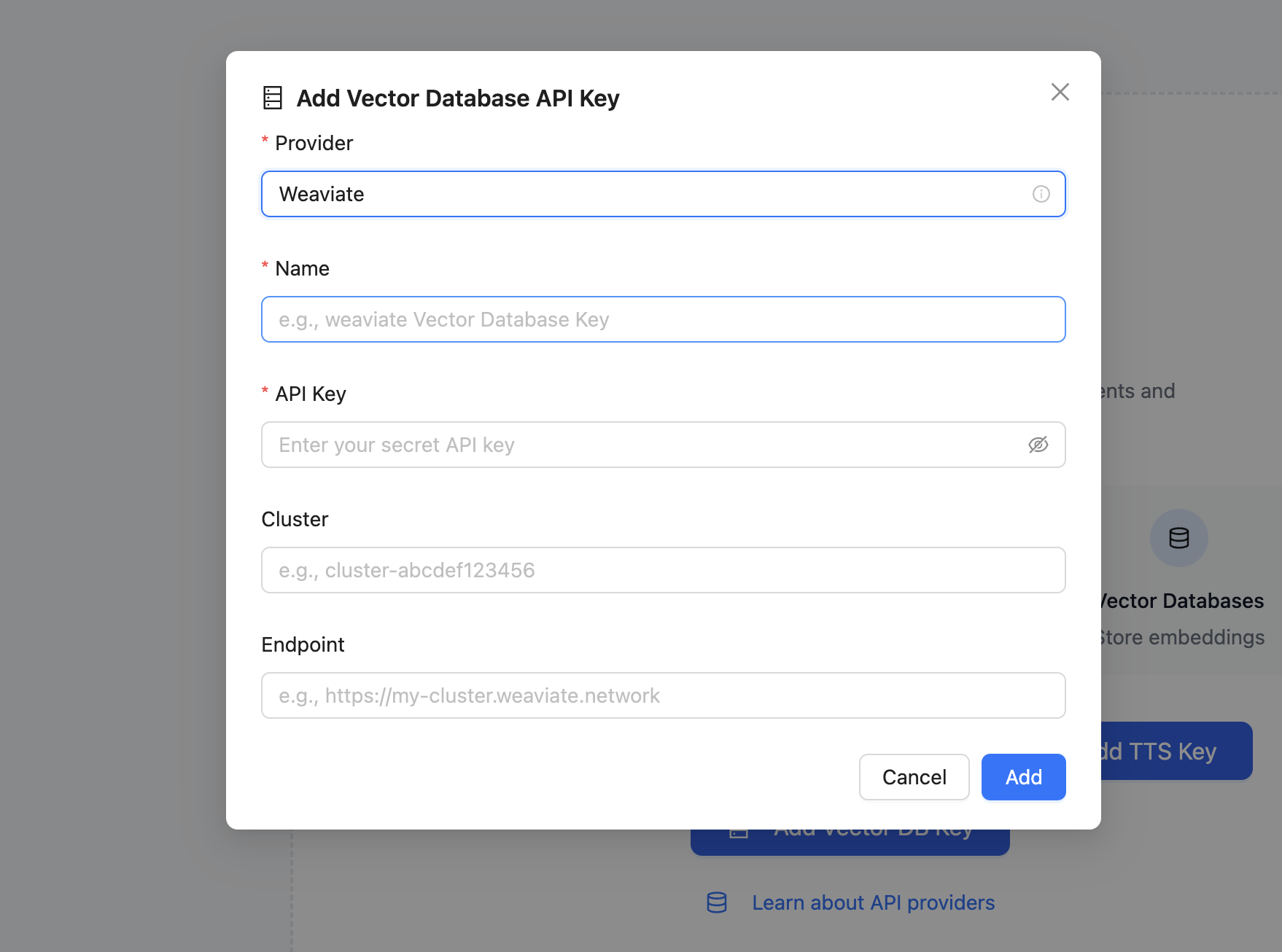
Step 3: Fill in Configuration Fields
- Provider: Choose from supported vector DB providers (e.g., Pinecone, Weaviate)
- Name: Provide a label to identify your key (e.g., "Support Docs Pinecone")
- API Key: Paste your provider-issued key securely
Step 4: Provider-Specific Fields
Additional fields may be required depending on your selected provider:
For Pinecone:
- Environment (e.g.,
us-west1-gcp) - Project ID
- Index Name
For Weaviate:
- Cluster Name
- Endpoint URL
Step 5: Save the Key
Click "Add" to save and encrypt your key in Kipps.AI. It will now appear in the key management table.
Managing and Using Your Vector DB Keys
Once saved, all keys are shown in a searchable table under the Vector Databases tab.

Management
- View Configuration: See provider-specific details
- Delete: Remove keys as needed
Using your own Vector DB keys ensures full ownership of your embeddings, aligns with enterprise data security policies, and eliminates usage-based markups.
Best Practices
- Use descriptive key names: Name keys by their purpose, not just the provider (e.g.,
"Support Docs – Pinecone"instead of"Pinecone Key 1"). This makes it easy to identify which knowledge base each key serves. - Create separate indexes per knowledge domain: For large deployments, use distinct Pinecone or Weaviate indexes per business unit or product line. This improves retrieval accuracy and lets you manage data retention independently.
- Rotate keys periodically: Treat vector database API keys like any other secret—rotate them on a schedule and update the entry in Kipps.AI promptly to avoid service interruption.
- Monitor your provider's usage dashboard: Kipps.AI does not enforce quotas on your vector DB reads/writes. Keep an eye on your provider's billing dashboard to catch unexpected spikes early.
Troubleshooting
The knowledge base failed to train after I added my vector DB key. Verify the index name, environment (for Pinecone), and cluster URL (for Weaviate) are all correct. A single mistyped character in any of these fields will prevent the connection. Delete the key, re-enter all fields carefully, and retry training.
Training completes but the agent gives incorrect or irrelevant answers. This usually indicates the embedding model used during training does not match the one configured in your vector DB index. Ensure the embedding dimensions in your Pinecone or Weaviate index match what Kipps.AI uses during ingestion.
I deleted a vector DB key but the agent still retrieves answers. Kipps.AI caches recent query results for a short period. After deleting a key, the agent will lose retrieval capability once the cache expires—usually within a few minutes.
Frequently Asked Questions
Which vector database providers does Kipps.AI support? Kipps.AI currently supports Pinecone and Weaviate. More providers may be added in future releases. Contact support if you need a specific provider.
Can I use one vector DB key for multiple knowledge bases? Yes. A single API key can be shared across multiple knowledge bases in Kipps.AI, as long as they use separate index names within the same provider account.
Does Kipps.AI store my vector embeddings on its own servers? When you bring your own vector DB key, all embeddings are stored in your provider account (Pinecone or Weaviate). Kipps.AI only stores the key credentials and metadata—not the embedding vectors themselves.
What is the difference between a "Pinecone Environment" and an "Index Name"?
The Environment refers to the cloud region where your Pinecone project is hosted (e.g., us-east1-gcp). The Index Name is the specific data store within that environment where your embeddings are saved. Both are required for the connection.
Can I switch the vector DB provider after my knowledge base is already trained? Yes, but switching providers means you will need to retrain the knowledge base so the new provider ingests the embeddings. The old provider's index will retain data until you manually delete it from your provider's dashboard.
Related Articles