Lead Qualification Campaign – Voice Lead Qualification Automation
Learn how to create a Voice Lead Qualification Campaign in Kipps.AI that uses an AI Voice Agent to call leads, speak a qualification script, and extract key details using prompts and custom parameters.
Overview
A Lead Qualification Voice Campaign allows your AI Voice Agent to automatically place calls to your contacts, speak with them using a predefined prompt, and extract important information from their responses using AI.
The system captures structured data such as name, intent, budget, callback preferences, and other custom parameters defined by you.
This guide walks you through the full process: creating the campaign, configuring the voice prompts, defining qualification parameters, and reviewing extracted values.
Step 1: Navigate to Campaigns
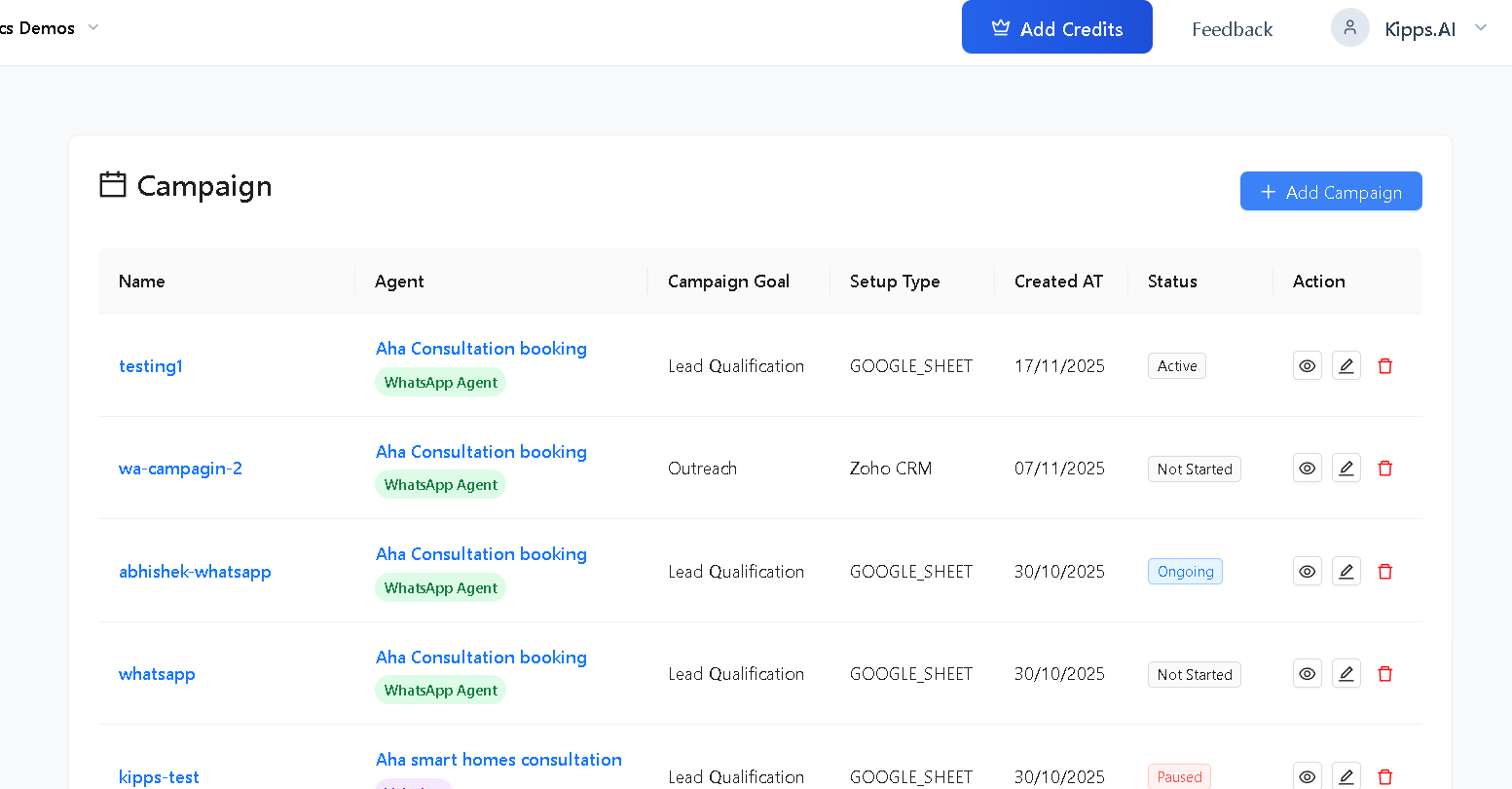
Go to the Campaigns section on the Kipps.AI dashboard.
Step 2: Add a New Campaign
Click Add Campaign in the top-right corner.
Step 3: Configure Campaign Details
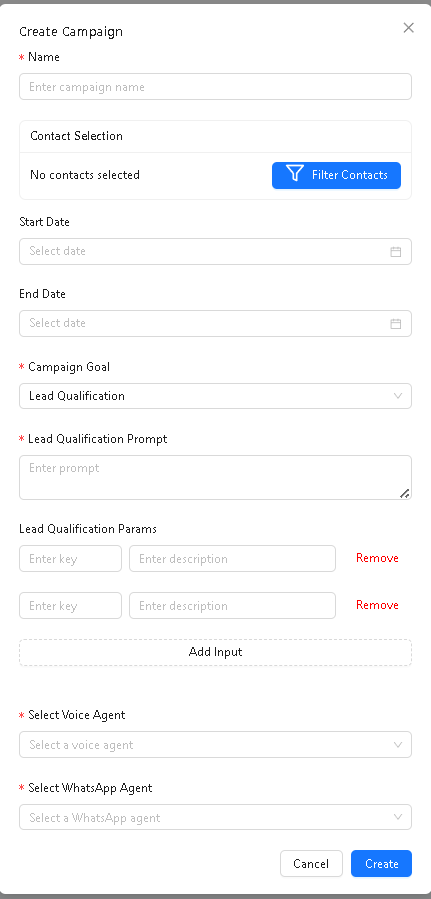
Fill Basic Details
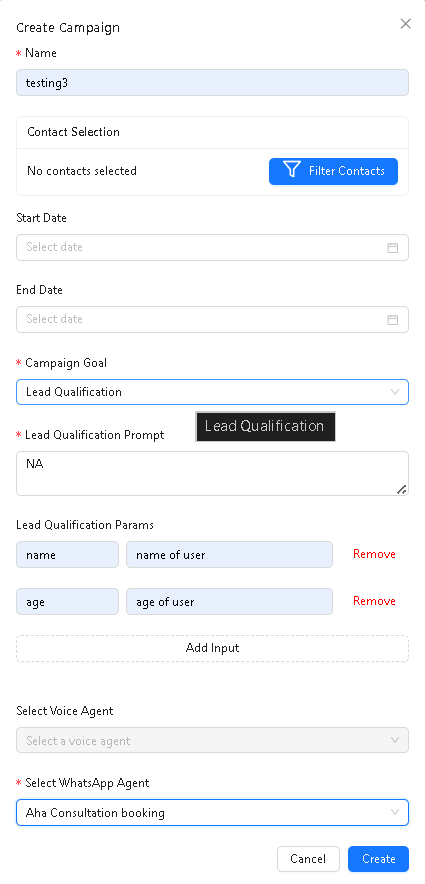
- Enter the Campaign Name
- (Optional) Select Start Date
- (Optional) Select End Date
- Select Campaign Goal → choose Lead Qualification
Step 4: Add Lead Qualification Prompt
The Lead Qualification Prompt is the core intelligence behind the campaign.
It instructs the AI Voice Agent:
- what data to extract
- how to interpret the caller’s responses
- how the qualification logic should behave
Example:
“Ask the user about their name and requirement. Extract name, requirement, and interest level. If any value is missing, leave it blank.”
This field is required.
Step 5: Add Lead Qualification Parameters
Parameters define exactly what information the AI should extract from the conversation.
Add Inputs
- Click Add Input
- Enter a Key (e.g., name, requirement, budget, interest_level)
- Enter a Description explaining what the AI should extract
- Add unlimited parameters
- Use Remove to delete any parameter
These parameters appear in analytics and lead data.
Step 6: Select Voice Agent
Choose the Voice Agent that will make the outbound qualification calls.
This is required before proceeding.
The Voice Agent uses:
- Initial greeting
- System prompt
- Qualification logic
- Your lead parameters
to run the automation.
Step 7: Configure VoiceBot Behavior
(No templates required in voice campaigns)
Unlike WhatsApp campaigns, voice campaigns do not use message templates.
You will configure:
- Opening Greeting
- System Prompt (core personality + instructions)
- Qualification Prompt (what the call should ask & extract)
- Qualification Parameters (keys to extract)
The AI VoiceBot will use your combined instructions to run the call flow.
Step 8: Finalize and Create Campaign
- Review all details
- Click Create
Your Voice Lead Qualification Campaign will be active or scheduled depending on the selected dates.
Once started, the AI Voice Agent automatically begins calling leads.
Step 9: How Voice Qualification Works
1. AI Voice Agent Calls the User
Your selected voice agent places an outbound call to each contact.
2. Conversation Happens in Real Time
The AI asks questions, listens, and interprets responses using the prompt you provided.
3. AI Extracts Data
Based on:
- your Lead Qualification Prompt
- your parameter keys
- your descriptions
AI extracts structured fields such as:
- name
- requirement
- age
- interest level
- budget
- callback preference
4. Retry Logic
If extraction fails:
- AI retries extraction once
- If still unsuccessful → the field remains blank
5. Data Storage
Extracted values are saved into:
- the Lead Fields
- campaign dashboard
- contact profile
- lead status parameters
- analytics & filters
6. No Additional Calls or Messages
The system does not make follow-up calls.
Extraction is based solely on the call interaction.
Step 10: Monitor Campaign Performance
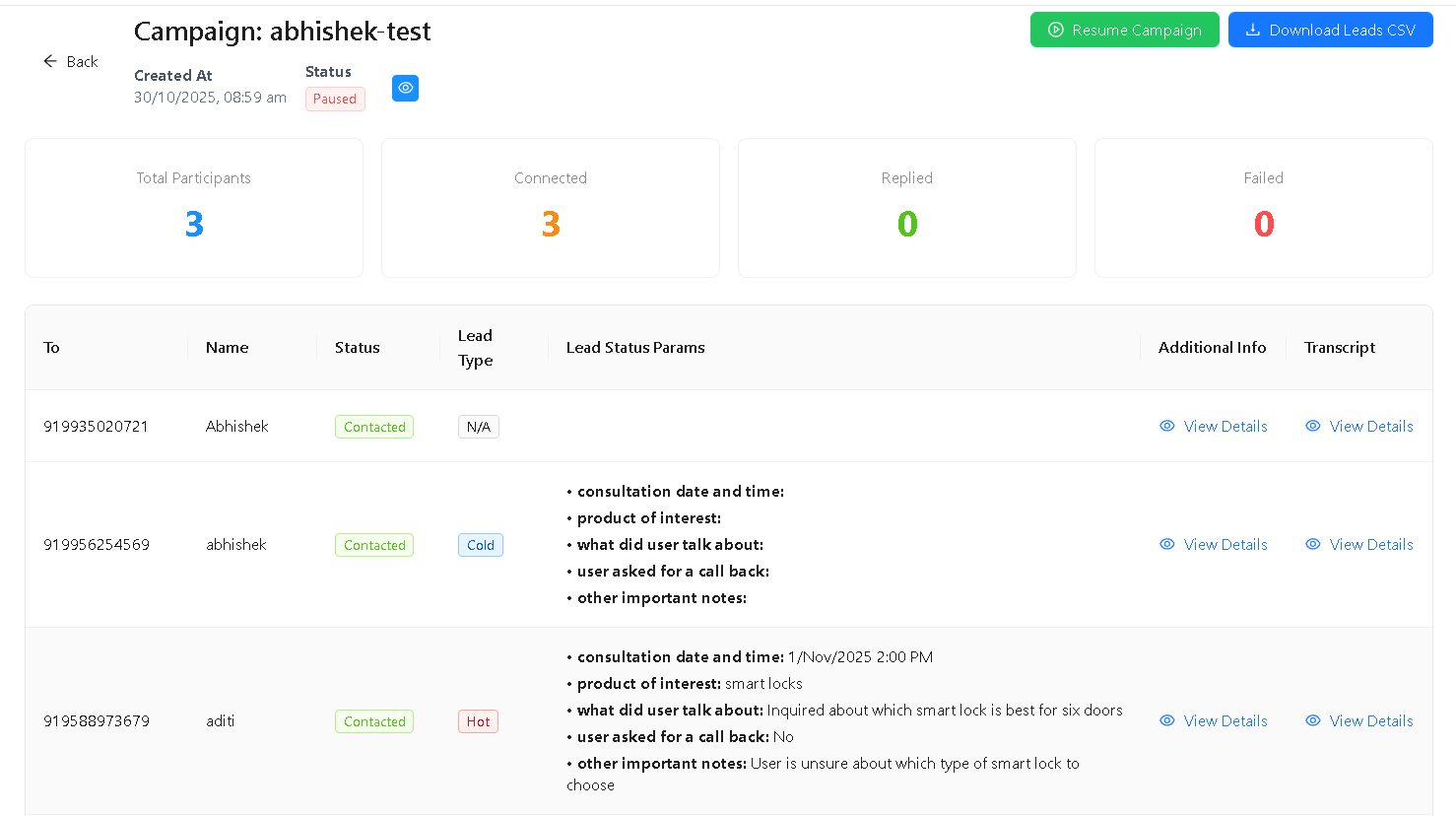
After creating the campaign, click the campaign name to view analytics.
Dashboard Metrics Include:
- Total Participants
- Contacted
- Connected (call answered)
- Replied / Provided responses
- Failed / Not reachable
Lead Status Table Displays:
- Phone number
- Name
- Status
- Lead Type
- Extracted Qualification Params
- Conversation summary
Use Download Leads CSV to export all extracted lead data.
Example
Suppose your parameters are:
- name → “name of user”
- requirement → “user’s requirement”
Your prompt:
“Ask the user for their name and requirement. Extract both fields.”
If the user answers during the call:
“I am Rahul and I need a website built.”
AI extracts:
- name: Rahul
- requirement: website built
These values appear in:
- Lead Status Params
- Contact details
- Filters & analytics
Notes
- Lead Qualification Prompt is required
- Parameter Keys & Descriptions must be complete
- Voice Agent must be selected before creating the campaign
- Start Date cannot be in the past
- Unlimited parameters supported
Troubleshooting
The campaign is making calls but no lead data is being extracted. Verify that the Lead Qualification Prompt explicitly instructs the AI to collect and extract each parameter. For example: "Ask the caller for their name and interest level. Extract: name (string), interest (high/medium/low)." The parameter Keys in the campaign must match what the prompt references. A generic prompt without specific extraction instructions will not produce structured lead data.
Many calls show "Call Failed" status.
Call failures are most commonly caused by invalid phone numbers (wrong format, disconnected numbers, or numbers outside the supported region). Verify all contact phone numbers use E.164 international format (+CountryCodeNumber). Also confirm the Voice Agent has an active outbound phone number assigned to it.
The Lead Qualification Campaign is making calls but contacts keep being marked "Not Qualified". Check the Voice Agent's call history and listen to recordings. "Not Qualified" usually means the caller did not provide complete answers to the qualification questions. Refine the agent's System Prompt to ask questions more naturally and handle short or incomplete answers by probing further before ending the call.
Frequently Asked Questions
What is the difference between a Voice Lead Campaign and a Voice Outreach Campaign? A Voice Outreach Campaign makes calls to contacts using a scripted agent to deliver information, reminders, or announcements. A Voice Lead Campaign uses an AI agent to conduct a qualification conversation and extract structured data (name, budget, requirements, timeline) from callers that appears in the lead dashboard for your sales team.
Can I review the call recordings to verify qualification accuracy? Yes. Each call in the campaign is logged in the Voice Agent's Call History. You can listen to recordings and read transcripts to verify whether the AI extracted data correctly and whether the qualification conversation was effective.
How many qualification parameters can I add? You can add unlimited parameters to a Lead Campaign. However, asking too many questions in a single call increases hang-up rates. Focus on the 3–5 most critical data points for your sales process, and let the agent ask follow-up questions naturally rather than listing all questions at once.
Can the same voice agent be used for multiple lead campaigns simultaneously? Yes. The same Voice Agent can serve multiple campaigns at the same time. The agent's configured instructions, knowledge base, and qualification prompts are shared, but each campaign tracks its own leads and analytics separately.
What happens to contacts who do not answer the call? Unanswered calls are recorded as failed or unreached depending on your telephony configuration. Some plans support automatic retry logic that attempts to call unreached contacts again after a defined interval. Check your campaign settings for retry configuration.
Related Articles