VoiceAgent – Introduction
Learn how to create and launch intelligent AI AI Voice Agents with real-time conversational capabilities in Kipps.AI.
Introduction to AI Voice Agents in Kipps.AI
The VoiceAgent module in Kipps.AI enables you to build intelligent AI agents that engage in real-time, human-like conversations through voice. These are not traditional IVR systems or static menus—they are dynamic, conversational agents that listen, understand, and respond naturally.
AI Voice Agents on Kipps.AI are designed to automate a wide range of call-based interactions, from customer support and lead qualification to outbound campaigns and appointment scheduling. Whether your goal is to provide round-the-clock assistance or scale call operations during peak hours, our platform equips you with everything needed to create, configure, and deploy powerful voice agents.
Core Architecture: Three Pillars of a VoiceAgent
Each VoiceAgent is powered by a tightly integrated pipeline consisting of three core components:
1. Speech-to-Text (STT): Interpreting the User's Speech
The STT engine captures the caller’s audio and transcribes it into text in real time. Kipps.AI supports leading STT providers including:
- Deepgram
- Google Cloud Speech-to-Text
- OpenAI Whisper
Accurate transcription is essential for meaningful AI interaction.
2. The Brain: Large Language Model and Knowledge Base
Once the speech is transcribed, the text is processed by the AI engine:
- Large Language Model (LLM): Handles context, intent, and response generation using advanced models from OpenAI, DeepSeek, or Gemini.
- Knowledge Base: Provides proprietary business information via Retrieval-Augmented Generation (RAG), ensuring brand-aligned, accurate answers.
3. Text-to-Speech (TTS): Delivering the Response
The response is synthesized into natural-sounding audio using TTS technology. Supported providers include:
- ElevenLabs
- Google Cloud Text-to-Speech
- Cartesia
You can customize the voice to reflect your brand’s tone and target audience.
Business Value of VoiceAgent Integration
AI Voice Agents offer a strategic advantage across customer service, sales, and operational efficiency.
24/7 Availability
AI Voice Agents are always on, ready to assist users at any time—including weekends and holidays.
Operational Cost Efficiency
Automate high-volume, repetitive conversations and reduce the need for large support teams.
Intelligent Lead Qualification
Ask targeted questions to qualify leads and automatically schedule follow-ups with tools like Cal.com.
On-Demand Scalability
Handle thousands of concurrent calls during high-traffic periods without service degradation.
Consistency and Brand Compliance
Deliver accurate, consistent, and brand-aligned messaging across all interactions.
Data and Insights
Gain detailed analytics on call volume, user behavior, and system performance for continuous optimization.
Creating Your First VoiceAgent
Step 1: Access the Main Dashboard
After logging into Kipps.AI, you will land on the main dashboard where all your agents—both chat and voice—are listed.
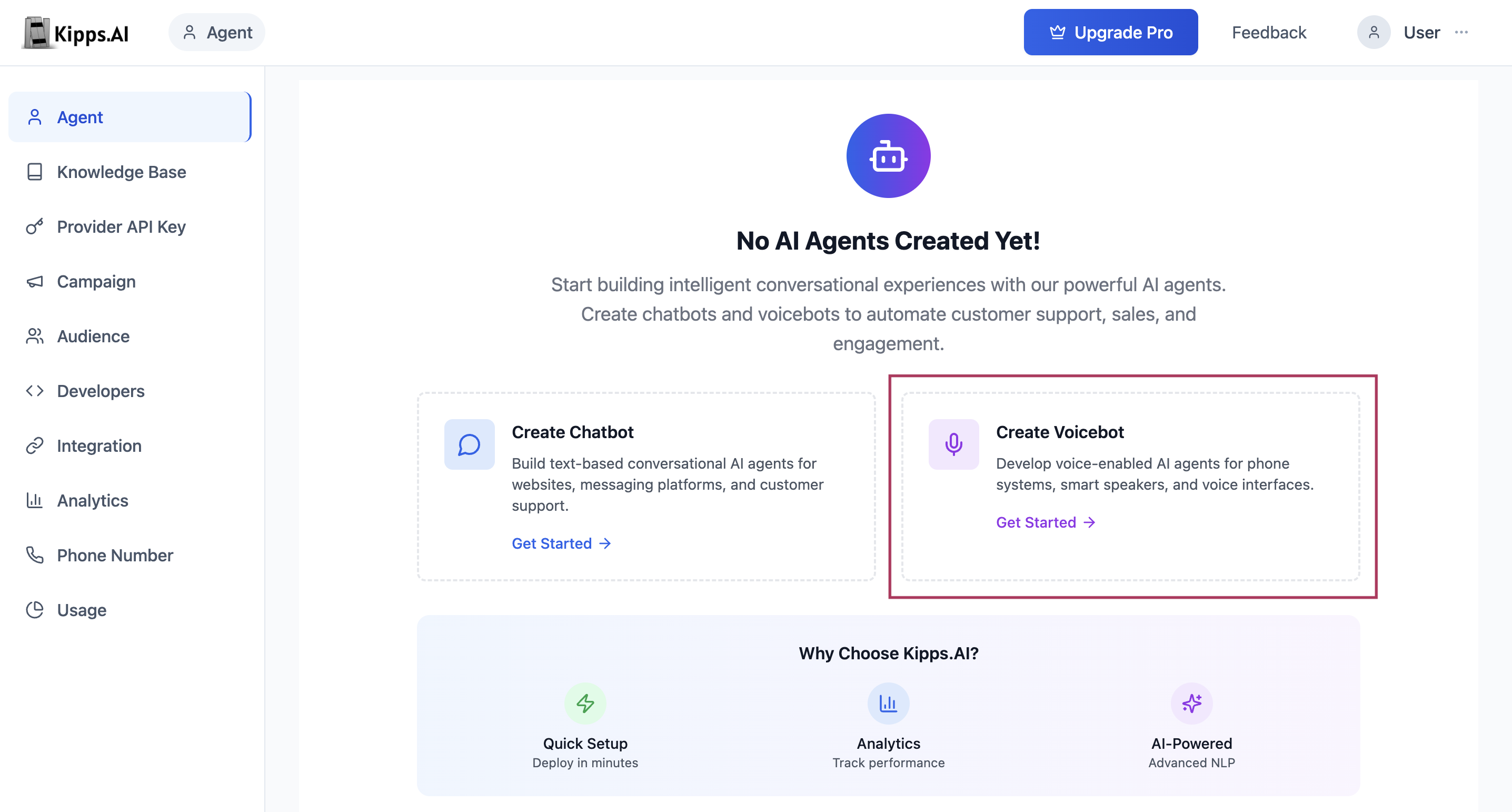
Step 2: Create a New VoiceAgent
- Click on the Create Agent button.
- Choose the Create VoiceAgent option from the available agent types.
Step 3: Automated Setup and Redirection
Upon creation:
- A new VoiceAgent instance is initialized with default configuration settings.
- You will be redirected to its configuration dashboard, starting with the Speech Settings section.
VoiceAgent Dashboard: Configuration Overview
The VoiceAgent dashboard provides full control over the agent’s capabilities and customization. Key areas include:
Speech Settings
Configure the voice and listening behavior by selecting TTS/STT providers, language, and speed.
Functions
Add custom logic and integrate external APIs to extend your VoiceAgent's functionality.
Embed
Generate embed code to integrate the VoiceAgent on your website or within other digital platforms.
Call History
View and manage logs of incoming and outgoing voice interactions.
Phone Numbers
Assign or purchase dedicated numbers for your VoiceAgent.
Analytics
Access insights and performance metrics for call handling, engagement, and more.
Cal.com
Configure calendar integration for scheduling meetings or callbacks.
With your VoiceAgent now created and visible in your dashboard, you’re ready to begin tailoring it to your specific use cases and customer journeys.
Next, continue to the Speech Settings section to define your VoiceAgent’s voice and behavior.
Troubleshooting
I created a VoiceAgent but it doesn’t appear in my dashboard. Refresh the page after agent creation. If the agent still does not appear, verify you are logged into the correct organization account. Agents are organization-specific and will not appear if you have switched accounts.
The VoiceAgent is created but callers hear no response or silence. This is usually caused by a missing or misconfigured Speech Settings. After creating the agent, complete the Speech Settings configuration (STT provider, TTS provider, and language). Without a valid TTS configuration the agent cannot produce audio output.
The VoiceAgent responds but the voice quality sounds robotic or unnatural. Switch to a higher-quality TTS provider or voice in the Speech Settings. ElevenLabs generally produces the most natural-sounding output. Also adjust speaking speed and select a voice that matches your use case (e.g., a warmer voice for customer support).
I cannot find the option to create a VoiceAgent. Your subscription plan may not include VoiceAgent access, or your role within the organization may not have permission to create agents. Contact your organization admin to confirm your access level and plan features.
Frequently Asked Questions
What is the difference between a VoiceAgent and a traditional IVR? A traditional IVR uses pre-recorded prompts and keypress menus. A Kipps.AI VoiceAgent understands natural language — callers can speak freely and the agent interprets intent, retrieves information from your knowledge base, and responds contextually. No keypress menus or scripted trees are needed.
How many VoiceAgents can I create? The number of VoiceAgents you can create depends on your subscription plan. Each agent is independent with its own speech settings, knowledge base, functions, and phone number assignments. Check your plan’s agent limit in the account settings.
Can a VoiceAgent handle inbound and outbound calls simultaneously? Yes. The same VoiceAgent can be assigned to a phone number for inbound calls and used in outbound campaigns simultaneously. The agent configuration (instructions, knowledge base, functions) applies to both call directions.
Do callers need to press any buttons or follow a menu with a VoiceAgent? No. Callers simply speak naturally. The VoiceAgent listens, interprets the caller’s intent using AI, and responds conversationally. There are no menus, keypresses, or scripted paths required.
What languages does the VoiceAgent support? Language support depends on the STT and TTS providers you configure. Most providers (Google, Deepgram, ElevenLabs) support dozens of languages. Select the appropriate language in Speech Settings to match your caller audience.
Related Articles